WWW File Share Pro - How to set protection for directories and files?
| If you want to set protection for certain directories or files,
please follow these steps: 1) Go to the "File protection" panel on the "Settings" window. 2) Select the "Protect specified files and directories" check-box. 3) To protect a directory, please click the "Add dir" button. To protect a file, please click the "Add file" button. 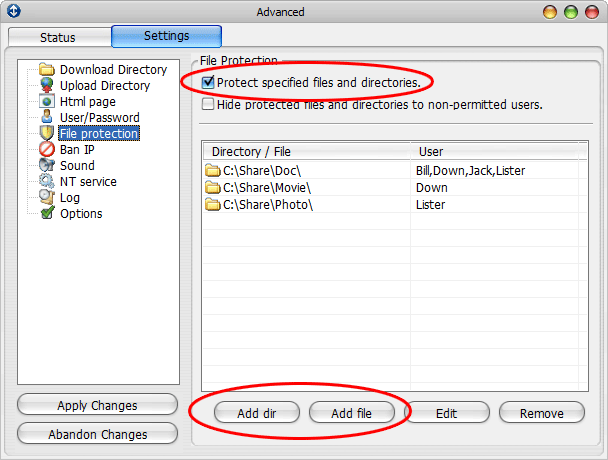 4) Browse and select the directory or the file that you want to protect. Add one or more users to the "Permitted users" list. 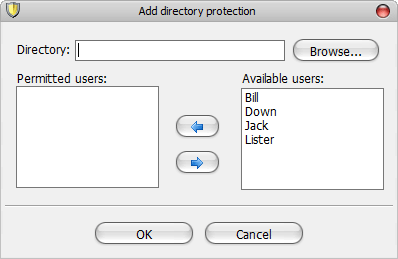 5) Click the "OK" button. Note: * If you don't know how to add new users, please read this page. * If one user who has no "download right" is permitted to access a certain directory or a certain file, this user will automatically get the right to download files from that directory or to download that file. Still this user can not download other files. * You don't have to select the "Enable password protection for the whole site." check-box to enable directory protection. 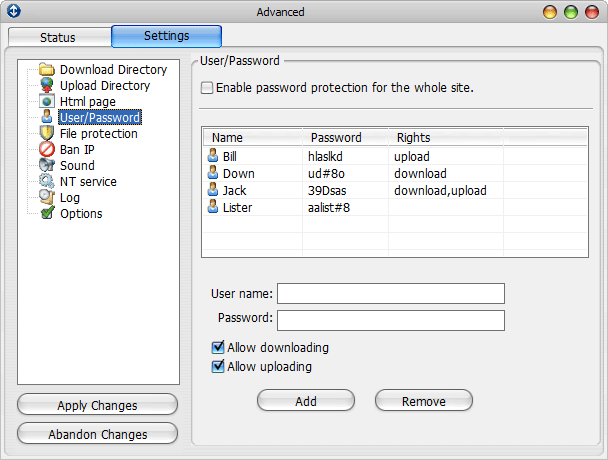 * Don't forget to save your settings by clicking the "Apply Changes" button. The change will take effect immediately. |